Etzel Art of Digital Manufacturing
TR
Enterprise integration platform

Lunex

Design and run integrations between SAP, cloud applications and your on-premise systems on one platform, and track every message.

OPC UA MQTT Kafka REST { } SAP RFC Salesforce AWS S3 JDBC MESSAGE MONITOR OPC UA → SAP RFC 42 ms MQTT → AWS S3 64 ms Kafka → JDBC 9 ms REST → Salesforce 180 ms LUNEX
350+ ready-made connectors: cloud services, databases and factory systems
Every message found by order or invoice number and traced step by step
Direct SAP connectivity: RFC/BAPI functions and transaction management
On-premise runs in your own data center or private cloud
Why Lunex

Build without waiting for a specialist, run it with your team

Cut consulting time

The AI agent writes and tests the flow; your specialist reviews and approves it. Flows are readable in the visual designer, so your own team can take over maintenance.

Never lose track of a message

Every message can be found by order or invoice number, so the support team sees the failing step for itself. Failed messages in the queue are not deleted; they are retried.

Find connections ready to use

More than 350 connectors bring cloud services, databases and factory systems together in the same flow, so you don’t write connections from scratch.

Connect to SAP directly

Lunex calls SAP functions (RFC/BAPI). You search for a function, see its fields and get a sample request ready to use; your agent works with the same information.

Give agents access safely

MCP-compatible agents such as Claude Code and Codex work with the employee’s own account and permissions, in the development environment only. They can’t reach production, and every change has a clear owner.

Keep data and control in your hands

Lunex runs in your own data center or private cloud, and users sign in with their corporate identity. Your flows stay in an open format, in your own Git repository.

How it works

Your team and the AI agent work together

Cover of the Central bank exchange rates to a REST service with a single prompt. video
Video · AI agent

Central bank exchange rates to a REST service with a single prompt.

The agent opens a project in Lunex and writes the OpenAPI contract and the routes; in the development environment the service returns live exchange rates from the Central Bank of the Republic of Türkiye (TCMB).
Features

One platform from design to monitoring

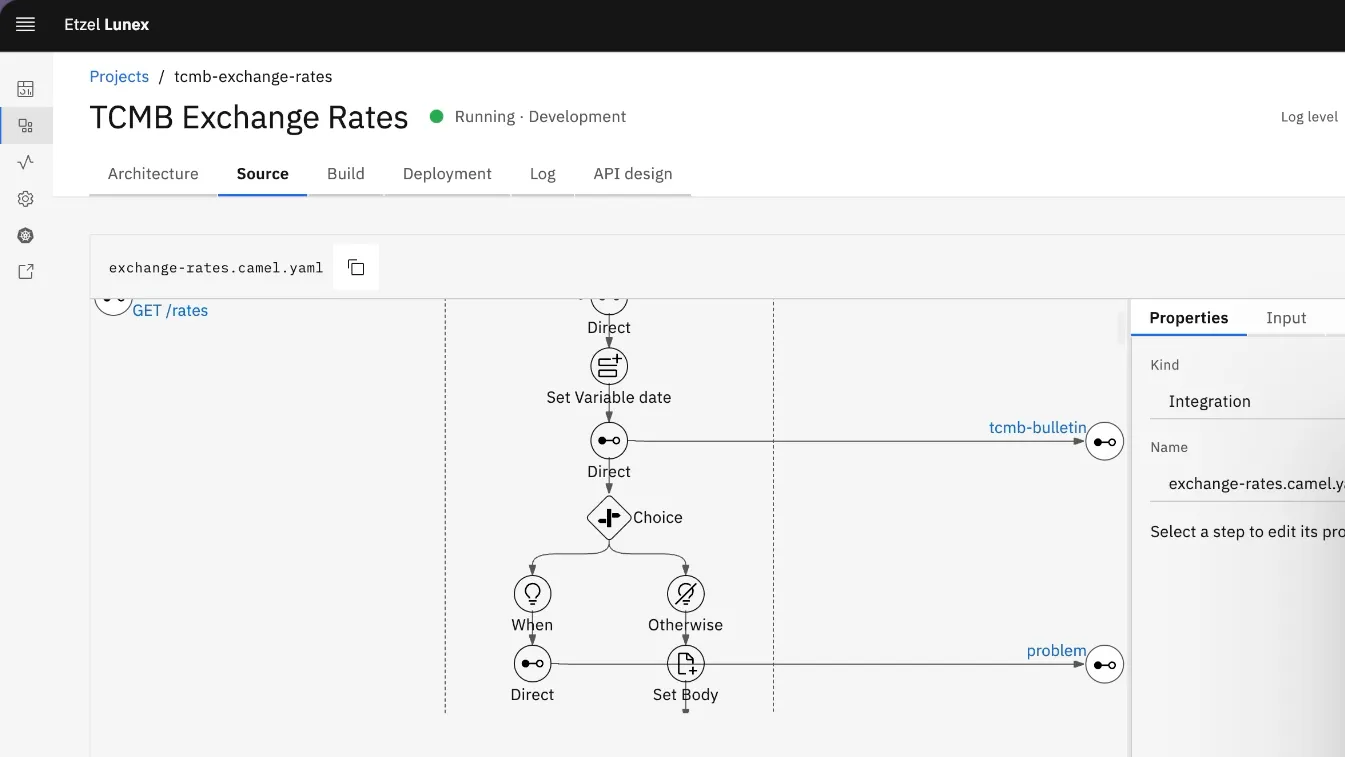
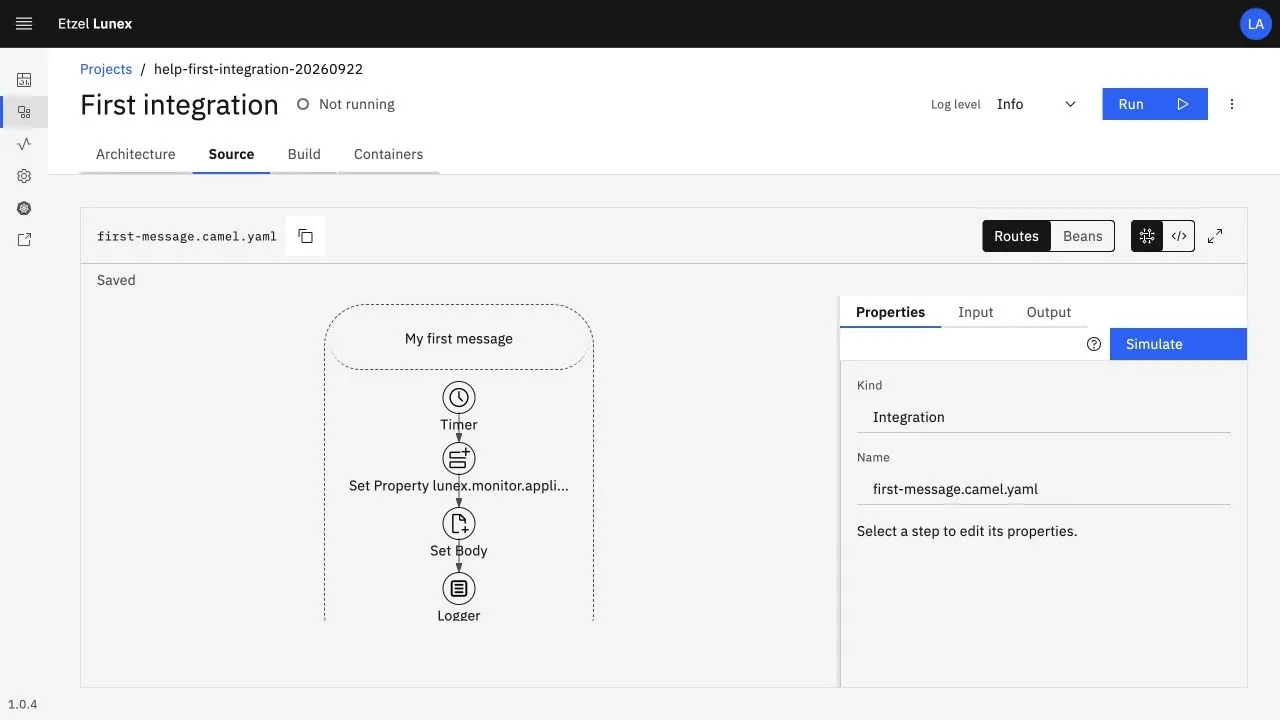
Every integration appears as a step-by-step diagram: timer, transformation, decision, target system. You select a step and edit its properties in the right-hand panel; the same flow also opens as YAML.

  • Switch between diagram and source view in one click
  • Step properties and required fields in the panel
  • Changes made by the agent are reviewed in the same diagram
Lunex flow designer: a flow made of timer, set property, set body and log steps

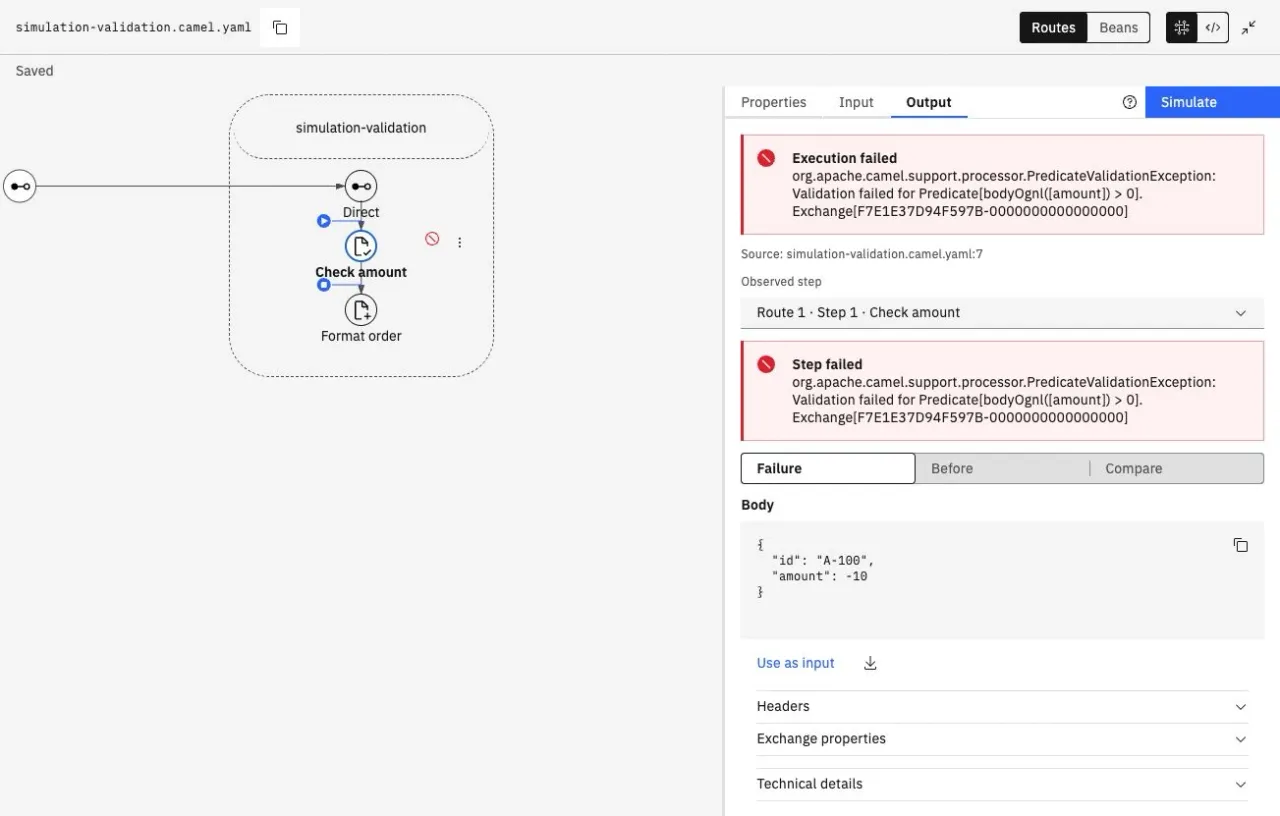
You run the flow with a sample input and see how the message changes before and after each step. If something fails, it states clearly at which step and by which rule the flow stopped.

  • Before, after and comparison for each step
  • The failing step is marked on the diagram
  • Use the result as input for the next run
Lunex simulation: a flow stopped at an amount check, with the failing step and the message body

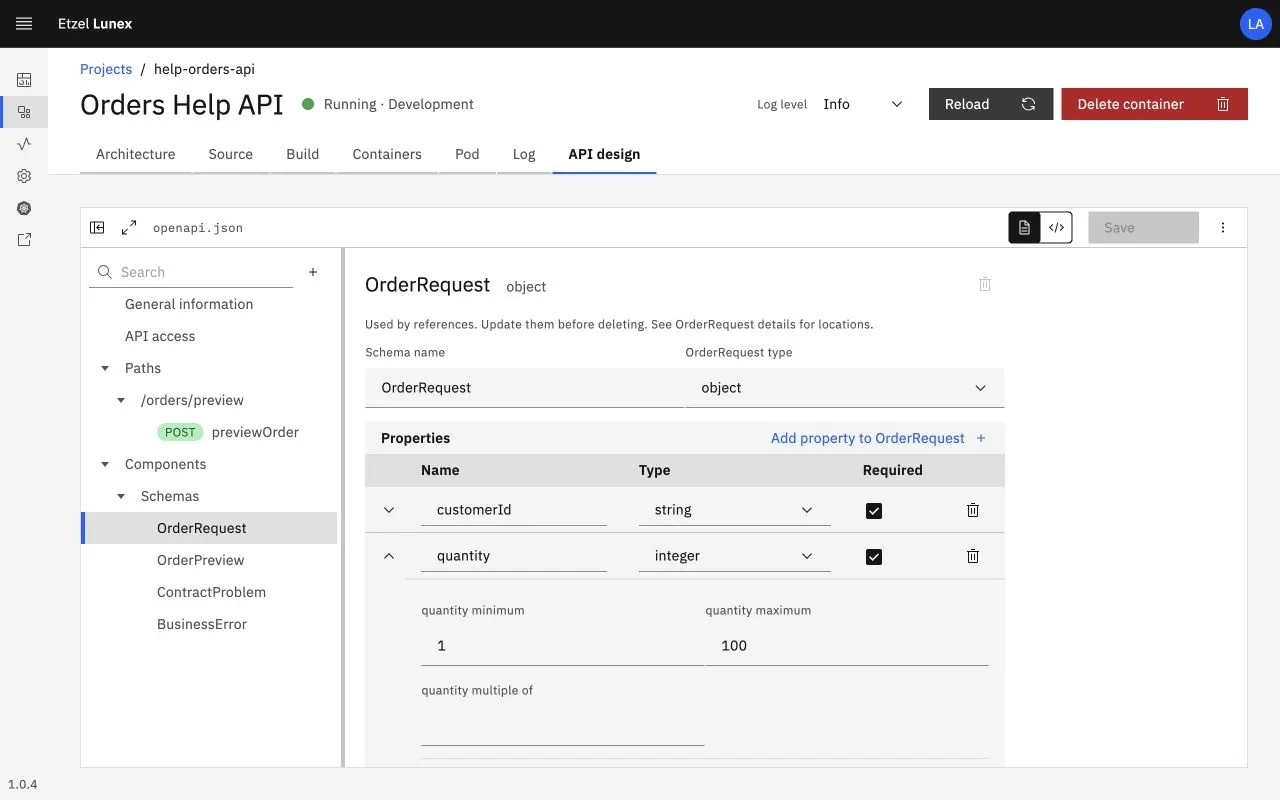
You build the OpenAPI contract in a visual editor: paths, operations, schemas, field rules. Each operation is bound to its own flow, and incoming requests are validated against the contract.

  • Schema, field type, required fields and limits
  • Shared error responses in one place
  • Access policy with JWT
Lunex API design: order request schema with its fields, types and limit values

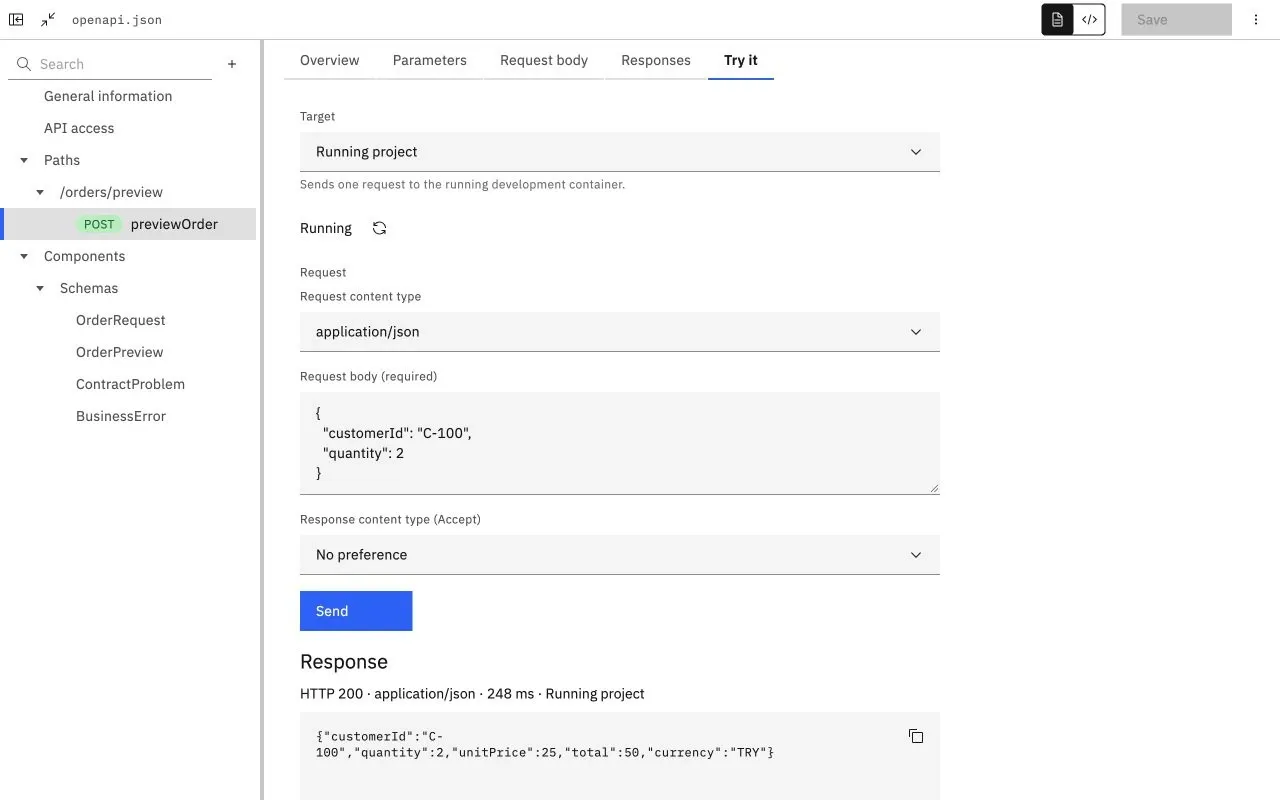
From the same screen you send a request to the running development environment and see the response, status code and duration. A request that breaks the contract comes back with the layer that rejected it.

  • Request to a mock or the running project
  • Response body, status code and duration
  • Validation errors per field
Lunex API testing: an order preview request sent to the running project and an HTTP 200 response

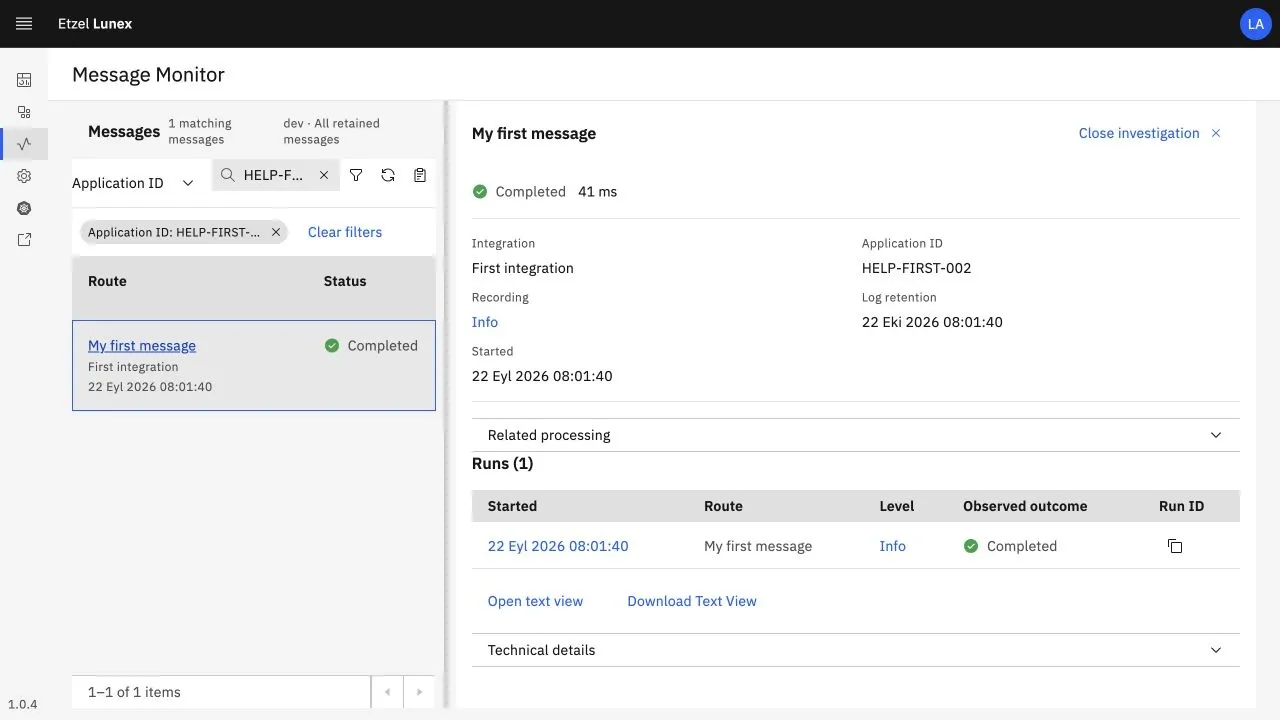
In Message Monitor you search for a message by order, invoice or a business number you define yourself. Which flow it passed through, how long it took and where it stopped are shown on one screen.

  • Search and filter by business number
  • Execution history and related transactions
  • Control over log level and retention period
Lunex Message Monitor: a message found by application ID, with its status, duration and execution history

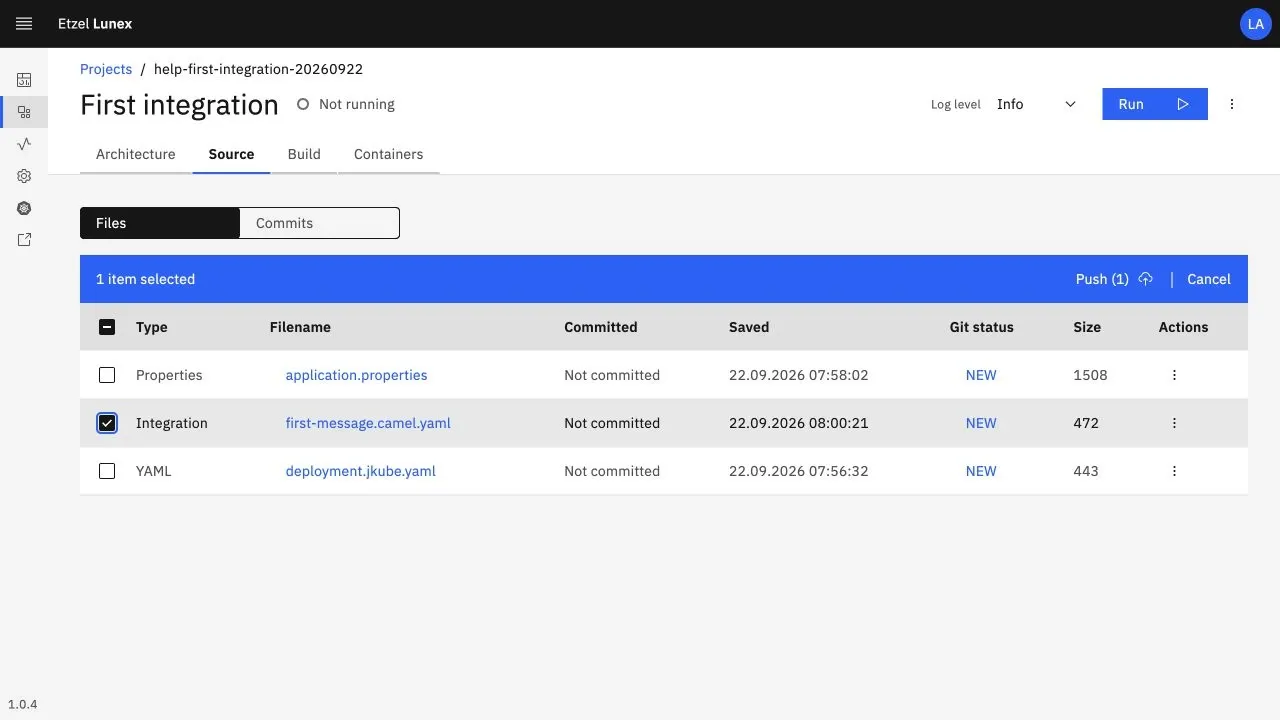
Flows are kept as YAML files in your own Git repository. You select the changed files and push them, build the version and move it from development to production from the same source.

  • Git status and commit per file
  • Release path from development to production
  • Open format, no vendor lock-in
Lunex project sources: Git status, save time and selection of files to push
Use cases

From finance to manufacturing and quality

Use case 01 · Finance

Central bank exchange rates

Fetch daily exchange rates automatically and write them to SAP right away, with full traceability.

  1. TCMB
  2. Lunex
  3. SAP
Scheduled · Logged · Versioned
Use case 02 · Manufacturing

Integrate with your MES

Connect production systems to SAP and other platforms; data in a single real-time flow.

  1. MES
  2. Lunex
  3. SAP · WMS · BI
Bidirectional · Error handling · Traceable
Use case 03 · Quality

Read the PDF, enter the result

Read the data in certificates and reports with AI and post quality results to the system automatically.

  1. PDF report
  2. Lunex AI
  3. Quality result
No manual entry · Every result recorded
Technical framework

Fits your enterprise infrastructure

Lunex runs on your own infrastructure, with your own identity system. Flows are kept in an open format in your Git repository, and connections use standard protocols.

Runtime

On-premise Kubernetes; installation with Helm, offline installation supported.

Flows

YAML files versioned with Git; the same source for development and production.

SAP

RFC/BAPI calls and transaction management with SAP JCo.

AI agents

Access over MCP, with the user’s own identity and permissions.

Security

Single sign-on with Keycloak/OIDC, role-based permissions, end-to-end HTTPS.

Messaging

Persistent queues; failed messages are kept and retried.

Connectivity

Standard protocols to reach any system

Web services, databases, file servers, messaging systems and OPC UA servers on the shop floor come together in the same flow. Try the two-way flow between SAP EWM and an automated warehouse in the ASRS demo.

  • REST
  • SOAP
  • JDBC
  • SFTP
  • Kafka
  • MQTT
  • OPC UA
  • SAP RFC/BAPI

SAP is a trademark of SAP SE. The SAP JCo library is provided under the customer’s SAP license. Other product names belong to their respective owners.

Frequently asked questions

Common questions

Where does Lunex run?

It runs on Kubernetes in your own data center or private cloud. Offline installation is supported for environments without internet access; your data never leaves your organization.

Can the AI agent access production systems?

No. Agents work with the employee’s own account and permissions, in the development environment only. Your team always makes the decision to go to production, and every change is recorded with the account that made it.

Does it connect to systems other than SAP?

Yes. There are more than 350 ready-made connectors, including REST and SOAP services, databases, file servers, messaging systems such as Kafka and MQTT, and factory systems over OPC UA.

Are our flows locked into Lunex?

No. Flows are kept as YAML files in an open format in your own Git repository; they are readable, versionable and stay within your organization.

See Lunex with your own integration

Write to us for a demo. In the first meeting we review the systems you want to connect and your existing integrations together.